Garmin Approach R50 review (2026): brilliant screen, one catch
As an Amazon Associate I earn from qualifying purchases.
CERTAIN CONTENT THAT APPEARS ON THIS SITE COMES FROM AMAZON. THIS CONTENT IS PROVIDED ‘AS IS’ AND IS SUBJECT TO CHANGE OR REMOVAL AT ANY TIME.
If you buy through links on this page we may earn a commission, at no extra cost to you.
You have a spare room, a net and a tax refund. The question is not whether the Garmin Approach R50 is good. It is whether a launch monitor that Garmin’s suggested retail price puts in the $5,000 tier is worth it when the thing it does best is something a laptop and a projector could also do.
Short version: buy the R50 if you want a simulator that runs straight off the box, with no PC, no tablet and no cables, and you mostly care about ball data. Skip it if you are a club-data obsessive, or if you want to carry it in your golf bag to the range.
The Garmin R50 launch monitor reads ball speed, launch and spin about as closely as units costing several times more, and its 10-inch touchscreen runs a full course simulator on its own. Club data is patchier, the unit is big, and owners have had a rough ride with some firmware updates.
Best for: a home sim in a tight room, played by people who want to hit balls rather than manage software. Skip it if: you need trustworthy face, path and attack angle on every swing, or you want a monitor that lives in your golf bag.


- Fine-tune your form with this premium launch monitor and simulator that utilizes a 3-camera system for precision metrics
- Tap into insights, select courses, review impact videos, or play a virtual round (subscription required) straight from the 10” built-in color touchscreen display
- Use advanced measurements to dial in your swing, including ball speed, launch angle, face to path (included tracking sticker required) as well as improved spin rate and axis both indoors and outside
- Understand every part of your game with training mode, which tracks stats for each club and shows a shot dispersion chart based on an advanced ball flight trajectory model
- Play virtual rounds — including putting — with up to four players on more than 43,000 courses through the Home Tee Hero (active Garmin Golf membership required); participate in a weekly tournament with scores posted to our global leaderboard — all viewable from the Approach R50 display

What makes the R50 different: it is the simulator, not just the sensor
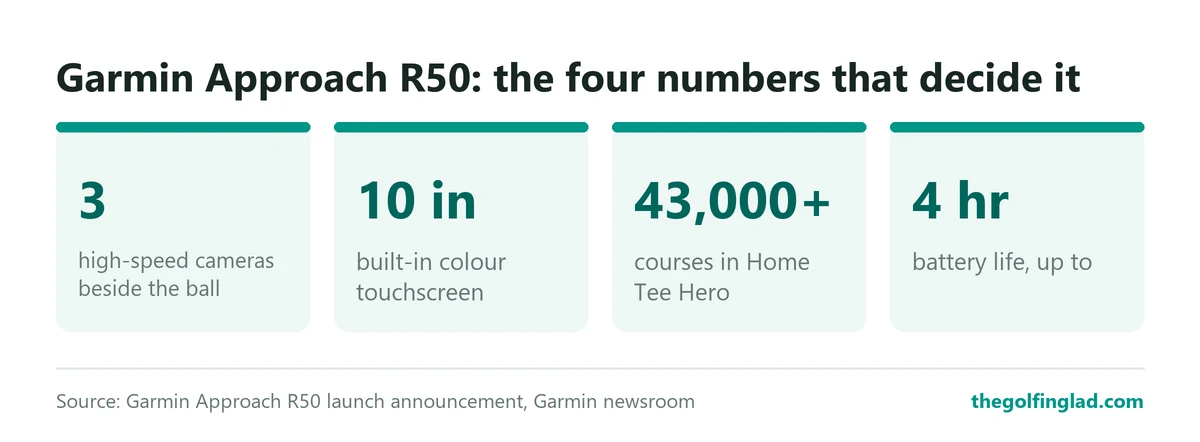
Most launch monitors are a box of sensors that hands its numbers to something else. The R50 flips that. Garmin’s launch announcement from November 12, 2024 describes it as one that “features a 10-inch built-in, color touchscreen display” and more than 43,000 preloaded courses through Garmin’s Home Tee Hero software.
In practice, that means you turn it on, pick a course and hit. No laptop on a stool beside the mat. No tablet propped on a bucket.
The second big change is how it sees the ball. The previous Garmin, the Approach R10, is a small radar that sits roughly 1.8 to 2.4 m behind the ball and needs at least 2.4 m of ball flight indoors, per retailer listings of its specs. The R50 uses three high-speed cameras and sits beside the ball. Golfstead’s review puts it about 0.5 m (1.5 ft) to the side of the tee, facing you.
On the course, or in the garage, that difference is the whole story. A camera unit measures the ball in the first moments after impact, so it does not need the ball to fly far. If your net is close and your room is shallow, the R50 suits it in a way the R10 never will. Our guide to how radar and camera simulators differ goes further into why.
Worth knowing: the R50 tracks club data with stickers. Garmin includes 250 of them, and Golfstead notes they go top-centre on the club face. Skip them and the club numbers get a lot less trustworthy, as Carlofet’s test puts it.
Ball data is the reason to buy it
The best independent numbers come from Carlofet’s accuracy test, which put the R50 beside a Trackman 4 indoors, 10 shots per club with the same ball.
Ball speed was the standout. With driver, the R50 averaged 146.6 mph against Trackman’s 146.4 mph, and Carlofet’s shot-by-shot ball speed difference averaged 0.82%. With 6-iron it was 0.72% and with a pitching wedge 0.15%. Ball speed drives everything else, so that is the number you most want right.
Carry ran slightly short. Driver averaged 218.4 yards on the Garmin against 226 on the Trackman, a 4.01% difference. The 6-iron read 175.5 against 181 yards (3.14%), and the wedge 126.41 against 128.5 yards (1.65%).
What does that mean for you? Your 6-iron might show five or six yards short of where it really lands. Annoying if you are gapping clubs to the yard. Irrelevant if you are playing a virtual round with your mates on a Friday night.
| Club (indoors) | R50 carry | Trackman 4 carry | Carry gap | Ball speed gap |
|---|---|---|---|---|
| Driver | 218.4 yd | 226 yd | 4.01% | 0.82% |
| 6-iron | 175.5 yd | 181 yd | 3.14% | 0.72% |
| Pitching wedge | 126.41 yd | 128.5 yd | 1.65% | 0.15% |
Spin was the shakiest of the ball numbers in that test, with driver spin 7.27% higher on the Garmin. Carlofet says one shot inflated that average, and the 6-iron and wedge spin gaps were 1.18% and 0.79%.
Other testers came out even more positive. Plugged In Golf found the ball data “almost perfectly in line” with a Foresight GCQuad. Golfstead, testing against a FlightScope Mevo+ and a Full Swing KIT, found spin averaged less than 100 rpm different from the KIT, and wrote:
Accuracy is comparable to the top units on the market
Golfstead, Garmin Approach R50 review
If you want the wider context on what these percentages mean, our piece on how accurate golf simulators really are lays out the test numbers across brands.
Club data is where it wobbles
This is the catch, and it matters most to the golfer who bought a launch monitor to fix a slice.
Plugged In Golf put it bluntly: “I found the club data to be hit and miss.” Some swings were not captured at all, many differed from the GCQuad, and angle of attack was the weakest metric. Its reviewer suggested the Full Swing KIT instead for anyone who puts club data first.
Golfstead saw the same pattern in a softer form. Ball speed, club speed and launch were very close, but degree-based numbers such as spin axis and face-to-path showed the biggest gaps, which its reviewer put down largely to setup differences between units.
On the course, that means the R50 will tell you reliably how far and how high the ball went. It is less dependable at telling you exactly why it curved. If your coach wants face-to-path on every swing, that is a real limitation at this price.
Outdoors it works, with a wind asterisk
Garmin pitches the R50 for home setups or any driving range, and it runs on a battery, so you can take it outside. Carlofet did, comparing it against measured carry in a backyard over 20 shots per club.
Across three clubs the average gap was 3.72%. Driver was off by 6.9 yards on average and the 6-iron by 5.5 yards. The misses were the problem: driver had individual shots off by 34, 27, 16 and 12 yards, and shots hit into wind tended to read short. Carlofet’s summary is fair:
The more controlled the environment, the better it does.
Carlofet, Garmin R50 accuracy test
Two more outdoor notes. Golfstead warns that direct sunlight on the unit or the club face can produce inaccurate data. And retailer listings give it an IPX3 water rating, which covers light spray, not a downpour. Bring it in when the clouds turn.
The screen and software are the best part
Golfstead called the 10-inch touchscreen “the best on-board display we’ve ever seen on a launch monitor”. Plugged In Golf says everything apart from the power button happens on that screen, ball flight appears within seconds of switching on, and you can choose graphics, data or a mix.
Its reviewer also called it “the most fun-to-use launch monitor I’ve ever tested”. That is the R50’s pitch in one line.
The software splits into Practice, Play and Connect, per Golfstead. Practice has four ranges: Distance Range, Crooked Creek, Green Valley and Palm Island. Play runs Home Tee Hero for up to four players, plus Weekly Tournaments. Player profiles keep names, handedness and units separate, so a left-handed partner does not wreck your stats.
There is a subscription. Home Tee Hero courses need a paid Garmin Golf membership, monthly or yearly. Some features beyond that, such as multiplayer rounds and weekly tournaments with global leaderboards, also sit behind the membership, according to Garmin.
Third-party sims work, but not on the built-in screen
Built-in Wi-Fi links the R50 to GSPro, Awesome Golf and E6 Connect and Apex, and Garmin says you can mirror to a projector or external monitor. Plugged In Golf lists HDMI, USB-C and charging ports behind a sliding cover.
The catch: only Garmin’s own software runs on the unit. GSPro and E6 need a PC or mobile device, which Carlofet calls its least favourite thing about the R50. So the “no PC needed” promise holds only as long as you stay inside Garmin’s software.
Space, size and setup
Setup is short. Golfstead walks through choosing a language, joining Wi-Fi and signing into a Garmin account, then waiting for a solid green status light. Auto-levelling handles a slightly uneven floor, and a target alignment tool lets you aim the unit at your screen.
The room you need is the R50’s quiet advantage. Because it sits beside the ball, you do not need the eight-plus feet behind the tee a radar unit wants. One owner on Garmin’s forum put it simply: “If you have enough room to swing a club the R50 captures the data.” Our guide to golf simulator room dimensions covers the ceiling height you will still need.
The size is the downside. Retailer listings give about 9 lb and 16.5 x 10.6 x 7.5 in. Golfstead says it is large and heavy and does not fit in a golf bag. It comes with a carrying case, but this is a box you carry to the range, not one you slip in a pocket.
Plugged In Golf also estimates the hitting area at about 70 square inches and found it often had to reposition the unit or the ball. You will want a marked spot on your mat.
Battery and firmware: the two things owners grumble about
Garmin rates the battery at “up to four hours”. Plugged In Golf saw similar life but noted a short window between the low-battery warning and shutdown, so plug in before a long session rather than mid-round.
Firmware is the bigger worry. Owners on Garmin’s R50 forum have reported bugs after updates, including putts under 10 feet not registering after software 4.80, which Garmin said a team was working on. Other threads describe the unit dropping into standby during GSPro sessions and disconnecting after the 3.80 update.
None of these is a hardware fault, and updates come and go. But if you play mostly through GSPro, read the release notes before you update.
Garmin Approach R50 specs at a glance
| Spec | Garmin Approach R50 |
|---|---|
| Tracking | Three high-speed cameras, beside the ball |
| Metrics | More than 15 ball and club metrics, incl. spin rate and spin axis |
| Screen | 10-inch colour touchscreen |
| Courses | 43,000-plus via Home Tee Hero (membership) |
| Battery | Up to 4 hours |
| Connections | Wi-Fi, Bluetooth, HDMI, USB-C |
| Third-party sims | GSPro, Awesome Golf, E6 Connect/Apex (via PC or mobile) |
| Size and weight | About 16.5 x 10.6 x 7.5 in, about 9 lb (retailer figures) |
| Water rating | IPX3 (retailer figure) |
| In the box | Carry case, AC adapter, power cord, 250 club stickers |
What’s good
- Ball speed within 1% of a Trackman 4 indoors in Carlofet’s test, with every club
- A complete simulator on the unit itself, with 43,000-plus courses and no PC needed
- Sits beside the ball, so short rooms and close nets are fine
- Setup in minutes, with auto-levelling
- Talks to GSPro, E6 and Awesome Golf when you want more
What’s not
- Club data, angle of attack especially, is inconsistent in tests
- Carry reads a few percent short, more so outdoors into wind
- About 9 lb and too big for a golf bag
- Third-party sims cannot use the built-in screen
- Firmware updates have broken short putts and connections for some owners
- Course play needs a paid membership on top of the $5,000-tier price
What owners keep saying
Device works great but distances for all clubs are way off.
An R50 owner on Garmin’s community forum
That line sums up the split. Owners love the screen, the setup and the built-in simulator. The complaints cluster around carry distances that look short, which a Garmin moderator in the same thread suggested checking against target alignment and the impact video, and around firmware updates.
The short-carry reports line up with Carlofet’s numbers, so they are not imagined. They are also a few percent, not a broken unit, for most people posting.
Who should buy it, and who should skip it
Buy it if you are building a home sim in a room with limited depth, you want family and friends to pick up a club and play without a tech lecture, and you care more about where the ball went than about your swing path to a tenth of a degree.
Skip it if you are working on a swing fault with a coach and need club data you can trust shot to shot. Skip it too if you mostly practise at an outdoor range: you would be paying for a screen and simulator you rarely use, and carrying 9 lb to do it. And skip it if you already run GSPro on a gaming PC, because the R50’s best trick is then wasted.
Still working out the budget? Our breakdown of what a golf simulator really costs adds up the net, mat, screen and software around a unit like this.
Garmin R50 alternatives worth a look
The usual reasons to look elsewhere are price, club data and portability. These three cover each of them, and our ranked list of the best golf launch monitors for 2026 has the wider field.
| Garmin R50 | Garmin R10 | SkyTrak ST MAX | Full Swing KIT | |
|---|---|---|---|---|
| Tracking | Three cameras, beside the ball | Radar, behind the ball | Camera system, beside the ball | Radar plus camera, behind the ball |
| Who it suits | All-in-one home sim, short rooms | Range practice on a budget | Mid-budget home sim | Club-data seekers, deeper rooms |
| Price band | The $5,000 tier | The $500 tier | Under $2,000 | About the same as the R50 |
| The catch | Club data, size | Needs 8 ft of ball flight indoors | Small 4 x 4 in hitting zone | Needs 8 to 10 ft behind the ball indoors |
Garmin Approach R10: the cheaper Garmin for the range
The R10 is the radar unit the R50 sits above. Retailer spec listings give it a weight of 148 g without its tripod, a battery of up to 10 hours and an IPX7 water rating, against the R50’s four hours and roughly 9 lb. It tracks a similar list of ball and club numbers through the Garmin Golf app on your phone, and plays the same Home Tee Hero courses with a membership.
Retailer listings put it in the $500 tier, a fraction of the R50. Where it wins is portability: it fits in a pocket of your bag and shrugs off rain. Where it loses is indoors, since it wants 1.8 to 2.4 m behind the ball and at least 2.4 m of ball flight, and face angle is calculated rather than measured, according to one review cited in those listings. Take it if you mostly practise at the range. The catch: in a short garage it simply will not have room to work. Our full Garmin Approach R10 review has more.

- Work to improve your game at home, indoors or on the driving range with a portable launch monitor .Waterproof : IPX7.Control Method:Application,VoiceWater Resistant: Yes.Club Head speed accuracy : plus/- 3 mph, Ball speed accuracy : plus/- 1 mph, Launch angle accuracy : plus/- 1 degree, Launch direction accuracy : plus/- 1 degree.
- Track key metrics when paired with a compatible smartphone with the Garmin Golf app to help better your shot consistency, including club head speed, ball speed, swing tempo, ball spin, launch angle and more
- Understand your golf strengths and areas for improvement by using training mode, which tracks stats for each club and shows a shot dispersion chart based on estimated ball flight using the Garmin Golf app
- See and analyze your own swing with automatically recorded video clips that include the metrics of that swing when paired with a compatible smartphone with the Garmin Golf app
- With an active subscription and the Garmin Golf app, play virtual rounds on over 42,000 courses around the world and take part in a weekly tournament with scores posted to our global leaderboard
SkyTrak ST MAX: the mid-price home sim
SkyTrak calls the ST MAX a camera-based system on its own site, with 15 ball and club metrics and no stickers needed for club data. PlayBetter’s listing gives it a 4 x 4 in hitting zone, about four hours of battery and a weight of 1.7 lb, plus a speed training module built with GOLFTEC.
On price it sits under $2,000, well below the R50. It beats the Garmin on size and on not needing stickers. It loses on the screen: there is none to run a course on, so you need a tablet or PC, and SkyTrak’s fuller course plans are a paid yearly membership. Take it if you want a home sim on a mid budget and already own a device to run it. The catch: that small hitting zone means teeing up in the same spot every time.

- Includes 1 year of Core Foresight software at no additional cost
- Speed Training powered by GOLFTEC, exclusive to the ST MAX: guided drills and measurable insights help you build swing speed and unlock more distance
- Measures carry, total distance, ball speed, spin, launch angle, club head speed, smash factor, club path, face angle and face-to-path for a complete picture of every shot
- Built-in game improvement tools include skills assessments, bag mapping, randomized practice and the wedge matrix to help you dial in your distances
- Charge and play with dual USB-C ports for simultaneous charging and data transfer, plus a redesigned modular interior built for long-term calibration stability
Full Swing KIT: the same money, better club data
The Full Swing KIT pairs radar with a built-in high-resolution camera and reports 16 club and ball data points, including face angle, face to path, attack angle and club path, with no unlock needed. The free Full Swing app tracks data and video, and it works with GSPro and e6 CONNECT, sold separately.
It sits at about the same price as the R50. Plugged In Golf recommends it over the R50 when club data is the priority, and Golfers Authority credits it with roughly five hours of battery and a 5.3-inch OLED display. It loses on space: Full Swing wants 8 to 10 ft behind the ball and 8 to 10 ft of ball flight indoors, and its small screen will not run a course. Take it if you are working on your swing and have a deep room.

- ADVANCED MACHINE LEARNING 5D RADAR TECHNOLOGY: The most innovative Radar Technology, patented to get the most accurate readings in a more compact design at a lower cost. Full Swing KIT launch monitor is used and trusted by Tiger Woods, Jon Rahm, Dustin Johnson, and the TGL. This swing analyzer meets the highest standard in golf. Captures precise club and ball data in a compact, portable design. Built for golfers who want reliable feedback indoors and outdoors without complicated calibration.
- 16 KEY DATA METRICS: Measures carry distance, total distance, spin rate, spin axis, face angle, face-to-path, attack angle, launch angle, ball speed, club speed, smash factor, club path, horizontal angle, apex height, side carry, and side total distance. Offers clear insight into ball flight, control, and swing efficiency for focused practice. All shown on the full-color customizable display so you know what areas of your game you need to train.
- 4K CAMERA WITH 1080P OUTPUT: Integrated high-resolution camera provides crisp video for swing review and analysis. Enables clear playback through connected devices to help golfers identify adjustments and track progress over time. Analyze your swing and make adjustments in real time.
- FAST, PORTABLE SETUP: Compact housing fits easily into a golf bag and includes a protective case for travel. No alignment sticks or stickers required. Simply place the unit, select your club, and align using built-in video tools for quick start-up at the driving range, during a round of golf, or at home in a home garage or simulator. Ideal for golfers seeking to improve their swing, as well as instructors training and refining their students’ technique.
- SEAMLESS IOS/ANDROID CONNECTIVITY: View data on the bright OLED screen or sync to iPhone, iPad, Apple Watch, or Android devices through onboard Wi-Fi and Bluetooth. The Full Swing app stores historical sessions, video clips, dispersion charts, and bag management settings for long-term development.
Is the R10 the smarter buy?
For most golfers reading this, yes. If you practise at the range, hit outdoors, or have a room with eight feet of flight to the net, the R10 gives you Garmin’s simulator and app at a fraction of the cost, and you will barely miss the camera.
The R50 earns its price in one situation: a shallow indoor space where you want a plug-and-play simulator with nothing else to buy or wire up. If that is you, the R10 is not a cheaper version of the same thing. It is a different tool that will not fit your room.
Garmin Approach R50 questions buyers ask
Does the Garmin R50 need a subscription?
For practice and data, no. To play Home Tee Hero’s 43,000-plus courses you need a paid Garmin Golf membership, which also covers multiplayer and weekly tournaments.
Can I use GSPro on the R50 screen?
No. The R50 connects to GSPro, E6 and Awesome Golf over Wi-Fi, but those run on a PC or mobile device. Only Garmin’s own software runs on the built-in screen.
Does it measure putting?
Garmin says it gives analytics from driver to putter, and putting works in its simulator. Be aware that some owners reported short putts not registering after the 4.80 update, and putting is disabled in Weekly Tournaments, per Golfstead.
Do I have to use the club stickers?
For ball data, no. For club data such as face-to-path, yes. Garmin includes 250, and Carlofet found club data much less trustworthy without them.
Is it accurate outdoors?
Reasonably. Carlofet’s backyard test showed an average gap of 3.72% across three clubs, but with some large driver misses and short readings into wind. It is at its best indoors.
The verdict on the Garmin Approach R50
Our rating: 4/5 (editorial). The Garmin Approach R50 is the easiest way to own a proper home simulator: ball data that sits within a whisker of a Trackman for speed, a screen that does the job of a laptop, and a setup that suits short rooms. It loses a point for club data that cannot be trusted every swing, a few percent of carry that goes missing, and firmware updates that have tested owners’ patience. If you have a shallow room and want to play golf at home rather than build a computer setup, it is our pick in the $5,000 tier. If you have the depth or mostly practise outdoors, buy the R10 instead.
How we rated it: this is a research-based review. The rating draws on Garmin’s published specs, named third-party tests from Carlofet, Plugged In Golf and Golfstead, and reports from owners on Garmin’s community forum. We make no claim to have used the unit ourselves.
By The Golfing Lad
One thought on “Garmin Approach R50 review (2026): brilliant screen, one catch”
Comments are closed.