How to use a golf rangefinder: lock the flag, not the trees
As an Amazon Associate I earn from qualifying purchases.
CERTAIN CONTENT THAT APPEARS ON THIS SITE COMES FROM AMAZON. THIS CONTENT IS PROVIDED ‘AS IS’ AND IS SUBJECT TO CHANGE OR REMOVAL AT ANY TIME.
If you buy through links on this page we may earn a commission, at no extra cost to you.
You are 150 out, the flag is tucked behind a bunker, and there is a stand of oaks twenty yards beyond the green. You press the button and the screen says 171. Is that the pin or the trees?
That moment is the whole skill. A rangefinder is easy to switch on and surprisingly easy to fool, so here is how to get the number that matters, every time.
Short answer: Stand next to your ball, focus the eyepiece, brace your elbows against your chest, and put the crosshair on the flag. Hold the button and sweep slowly across the stick until the unit buzzes or flashes. Check the number against a tree or sprinkler head if it looks odd, switch slope off for competition, and treat the reading as plus or minus a yard or two.
What the number on the screen actually means
Before the step by step, know what you are buying into. A laser is accurate, but not to the inch, and the margin grows with distance. These are the figures that shape how you use one.
| What | Figure | What it means on the course | Source |
|---|---|---|---|
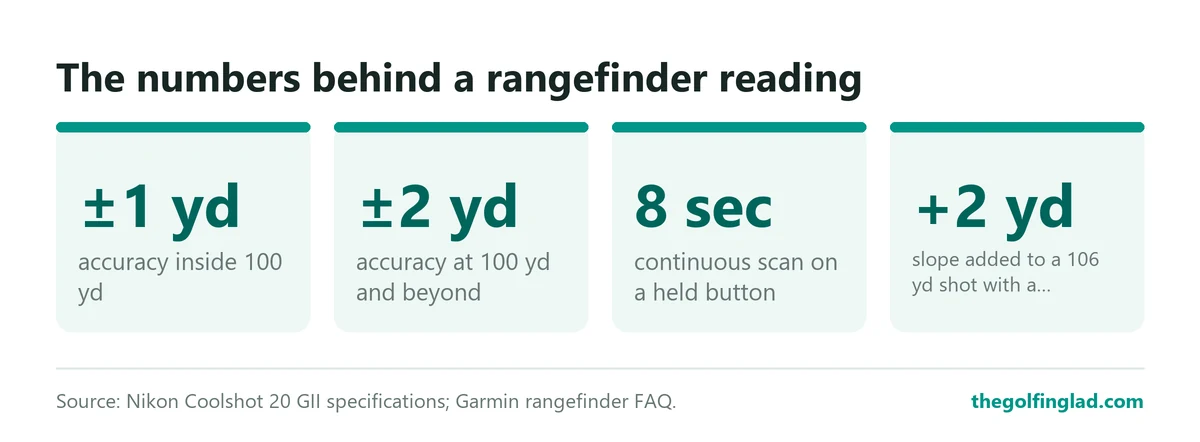
| Accuracy inside 100 yd | ±1 yd | Wedge numbers are as good as you can swing | Nikon Coolshot 20 GII |
| Accuracy at 100 yd and beyond | ±2 yd | A 150 reading means 148 to 152 | Nikon Coolshot 20 GII |
| Continuous scan | about 8 seconds | Long enough to sweep across a flag twice | Nikon Coolshot 20 GII |
| Hold time to lock | 2 to 3 seconds | Do not stab the button and let go | Golfers Authority |
| Slope adjustment | 106 yd plays as 108 yd | A 12-foot rise added 2 yards | Garmin |
| Magnification | 6x | The usual balance of size and steadiness | Garmin, Bushnell, Nikon |
The accuracy rows come from Nikon’s spec sheet for the Coolshot 20 GII, which states ±1 yd under 100 yd and ±2 yd from 100 yd out, under its own test conditions. Most budget lasers sit in that same band.
Using a golf rangefinder, step by step
This is the routine for using a laser rangefinder on the golf course, in the order you should do it. Run through it on the range or the first tee, not the 14th fairway with a group waiting.
- Fit the battery and check it. Most units take a single CR2, including the Nikon Coolshot 20 GII and the Bushnell Tour V6.
- Look through the eyepiece and turn the diopter ring until the crosshair and numbers are sharp. A blurry display makes you aim badly.
- Set yards or metres. On the Bushnell Tour V6 Shift that toggle lives under the settings cog on top.
- Decide on slope. Off for any competition, on for a casual round if you want it.
- Stand beside your ball, not where the cart is parked twelve paces away.
- Brace, aim at the flag, hold the button and sweep. Wait for the buzz, the flash or the lock symbol.
- Read the number, sanity-check it, then pick the club.
Steps two and five are the ones people skip. Both cost you yards before the laser even fires.
Rule: set the unit up once, before the round, and leave the menus alone after that.
How to lock onto the flag with a rangefinder
The flagstick is a thin target in front of big, reflective things: trees, banks, the clubhouse. A laser does not know what a flag is. It returns distances to whatever bounces the beam back.
That is why the good units have a mode that favours the nearest object. Nikon calls its version a “First Target Priority algorithm for displaying the distance to the closest subject when measuring overlapping subjects.” Bushnell’s PinSeeker does the same job, and on the Tour V6 the Visual Jolt adds a red ring around the yardage when it locks, alongside the vibration.
Your technique decides whether that mode gets a fair chance. The best advice on this is old and comes from an owner who was losing the same battle with trees behind the green.
Start to one side of the flag and “scan” it across from one side to the other
Stuey01 on the Golf Monthly forum
Here is why that works. If you aim dead at the stick and twitch, the beam hits the oaks and you get 171. If you sweep slowly across, the beam passes over the flag on its way, and a first-target mode keeps the closer reading. Hold the button the whole time; on the Coolshot 20 GII a held button gives about 8 seconds of continuous measuring.
Aim at the flag cloth and upper stick rather than the base. The base often sits below the lip of the green from the fairway, and the beam ends up hitting the fringe or a bunker face.
Worth knowing: if a number looks wrong, laser something behind the flag. The same forum thread suggests that a tree behind the green tells you whether your first reading was the pin or the background. Two readings 20 yards apart means the bigger one was the trees.
Rule: sweep, never stab. If the unit buzzes on the first pass, trust it; if it never buzzes, try again from the other side.
Shaky hands cost you more than a cheap laser does
A wobble at the eyepiece is a big movement 150 yards away. Golfers Authority’s guide warns that hand shake can throw readings off by several yards, especially on long shots, which is worse than the gap between a budget unit and a flagship.
The fix costs nothing:
- Grip with both hands and pin your elbows against your chest.
- Close your other eye.
- Lean on the cart frame if you are riding.
- Breathe out, then press.
Magnification cuts both ways. Garmin’s own buying guide puts it bluntly.
Higher magnification (7x and above) brings distant targets closer but narrows the field of view and amplifies hand shake.
Garmin’s rangefinder FAQ
That is why 6x is the norm on the Bushnell Tour V6, the Nikon Coolshot 20 GII and most lasers in between. The flag looks bigger than it does to your eye, and it does not dance about. If your hands really do shake, Garmin’s advice is to look for image stabilisation.
Rule: if your readings jump around on the same flag, fix your stance before you blame the laser.
Slope: use it to learn, switch it off to compete
Slope mode gives you a “plays like” number that accounts for elevation. Garmin’s example: a 106-yard shot with a 12-foot uphill rise plays as 108 yards. Two yards does not sound like much until it is the difference between the green and the false front.
The catch is the rules. Under Rule 4.3a you may carry a device with slope, GOLF.com notes, “provided they don’t use those functions.” At events such as the U.S. Amateur, rangefinders are allowed “but not the slope function.” A committee can also ban distance-measuring devices outright by Local Rule, and the USGA’s Open championships do.
So slope is a practice tool for most club golfers. Use it on casual rounds to learn what a steep green actually adds, and you will start judging it without the help.
Rule: if there is a card in your hand that goes to the pro shop, slope goes off. Buy a model with an external slope switch so your playing partners can see it.
Rangefinder tips for beginners
New owners tend to measure everything and use none of it. Three habits get more out of the thing:
- Laser the front of the green and the back as well as the pin. The flag is not always where you should aim.
- On a par 4, laser the bunker you want to avoid off the tee, then pick a club that cannot reach it.
- After a good strike, laser back to where you hit it from. A week of that tells you your real 7-iron number.
Pace of play matters too. Have the laser in your hand while you walk to the ball, and measure while others are hitting.
Rule: one reading for the pin, one for trouble, then put it away.
Which rangefinder makes this easiest
Everything above works on any laser, but the right features remove whole steps. The two that matter are a clear lock confirmation and an external slope switch.
If you want a vibration and a visual cue when it locks, plus slope you can see is off, the Bushnell Tour V6 Shift is the obvious choice. Bushnell’s launch notes list 6x magnification, 500-plus yards to a flag, an improved PinSeeker with Visual Jolt, the Slope-Switch and the BITE magnetic cart mount. Golfalot’s review found the slope switch is a sliding button on the left side, and weighed it at 240g, which it counted as a plus for steadiness.

- Slope-Adjusted Distances: This golf rangefinder measures the angle of incline/decline to provide slope-adjusted distances, helping you choose the right club for every shot. An external slope switch allows you to easily toggle slope mode on or off for tournament-legal play.
- Visual Jolt + Pinseeker: A red visual ring flashes and the rangefinder vibrates to confirm when you’ve locked onto the flag, giving you confidence you’re measuring the correct target.
- BITE Magnetic Mount for Easy Access: Stick the V6 Shift securely to your golf cart or any metal surface. Quick, one-handed grabs make this one of the most convenient golf accessories you can own.
- 1300-Yard Range + 6X Magnification: Ultra-clear optics with lightning-fast distance readouts. Locks in on flags from long distances, making it ideal for golfers seeking premium, tour-level golf equipment.
- Patriot Pack: Includes premium case, veteran coin, microfiber cloth, quick-start guide & CR2 battery. Built Bushnell-tough and wrapped in premium style, it's a great golf gift choice.

The criticism is fair. Golfalot called it “evolution rather than revolution” over the Tour V5, and the price sits well above the budget tier. If you never play competitions, the plain Tour V6 drops slope and keeps the same lock-on system.

- Visual JOLT with PinSeeker Technology – Feel the vibration and see the red ring flash when you’ve locked onto the flag for total confidence in your distance.
- Improved Accuracy & Consistency – New, enhanced electronics deliver Bushnell’s most consistent and longest-ranging Tour series performance ever—accurate yardages up to 1300 yards.
- BITE Magnetic Mount – Strong built-in magnet lets you attach the Tour V6 directly to your cart or any metal surface for quick access between shots.
- IPX6 Weather Resistant Housing – Rain or shine, the Tour V6 stands up to the elements with Bushnell’s most rugged Tour series design to date.
- Perfect Gift for Golfers – Includes a premium carry case, veteran coin, cleaning cloth, and quick start guide, making it a standout gift for any golf enthusiast.
On a tight budget, the Nikon Coolshot 20 GII is the honest minimum. It has First Target Priority, 6x, a 6-800 yd range, IPX4-equivalent rainproofing and 130 g of weight, but no vibration to confirm a lock. You read the number and use the sweep technique to trust it.

- Measurement range: 6-800 yds
- First Target Priority mode–useful for measuring the distance to a flagstick on a green with woods in the background
- High-quality 6x monocular with multilayer coating for bright, clear images
- Single or continuous measurement (up to 8 seconds) allows for quick, easy measurements to multiple targets
- Displays in 1-yard increments
Who should do what
If you play twice a month and never enter a medal, buy a slope unit, leave slope on, and learn what elevation does on your home course. Our best golf rangefinders with slope list has the shortlist.
If you play club competitions, buy a unit with an external slope switch and make switching it off part of your first-tee routine.
If you are new to the game, buy something with a vibration on lock. That buzz is the one feature that stops a beginner from playing to the trees. Our guide to the best golf rangefinders for beginners sticks to models that are simple to read.
If you are spending under $100, accept no buzz and lean hard on the sweep. The best golf rangefinders under $100 covers which cheap ones lock well.
Questions golfers actually ask
Why does my rangefinder keep reading the trees behind the green?
Because the trees return more of the beam than a thin stick does. Turn on pin-seeking or first-target mode, then sweep across the flag rather than aiming straight at it. If two readings differ by 15 or 20 yards, the shorter one is usually the flag.
Can I use a rangefinder in a tournament?
Usually yes for distance, unless the committee bans them by Local Rule. Slope must be off. Check the competition notice before the round.
How accurate is a golf rangefinder?
Nikon rates the Coolshot 20 GII at ±1 yd inside 100 yd and ±2 yd beyond. Your hands and your aim usually add more error than that.
Should I measure to the flag or the middle of the green?
Both, on any approach where the flag is near trouble. The pin number tells you the ideal; the front and back numbers tell you what a miss costs.
Does it work in fog or rain?
Poorly in thick fog. Golfers Authority notes that range can fall from 1,000 yards to about 100 yards. Light rain is a sealing question: the Coolshot 20 GII is rated rainproof to an IPX4 equivalent, which covers showers, not a soaking.
The verdict
Using a rangefinder well comes down to four habits: stand at the ball, brace, sweep across the flag, and switch slope off when it counts. Do those and a cheap laser beats an expensive one used badly.
If you are still choosing a unit, buy one that buzzes when it locks. For the full shortlist, ranked, see our best golf rangefinders for 2026.
By The Golfing Lad
One thought on “How to use a golf rangefinder: lock the flag, not the trees”
Comments are closed.