Best Golf Launch Monitors 2026: 8 Top Picks Tested and Ranked
Why Every Golfer Needs a Launch Monitor in 2026
If you’re still guessing why your 7-iron carries 145 one day and 165 the next, it’s time to stop eyeballing it. The best golf launch monitor you can buy will tell you exactly what your swing is doing — ball speed, clubhead speed, launch angle, spin rates, carry distance. No more “I think I hit it well.” You’ll know.
Golf launch monitors used to be $15,000 toys for club fitters and Tour pros. Not anymore. In 2026, you can get real data — like, actually useful data — from a golf launch monitor for under $250. And the premium stuff? It’s doing things that would’ve seemed absurd five years ago. Full simulator play on a 10-inch screen? Check. Doppler radar that fits in your golf bag? Check.
I’ve spent months testing these units on the range, in my garage, and during simulated rounds. This guide covers the best golf launch monitors on the market right now — 8 top picks from wallet-friendly to “yes, I really did spend that much.” Whether you want a portable golf launch monitor for range sessions or a full golf simulator setup for home practice, there’s something here for you.
Let’s get into it.
How We Tested These Launch Monitors
I’m not going to pretend I hit every shot perfectly. But I did hit enough of them — on the range, into a net in my garage, and on simulator courses — to get a real feel for each unit. Here’s what I cared about:
Accuracy: Does it give me numbers I can trust? I compared carry distances against my laser rangefinder on the range and checked club speed against a TrackMan at a fitting session. Every golf launch monitor in this review was tested the same way.
Usability: Can I set it up without reading a manual? Does the app crash mid-session? Is the screen readable in sunlight?
Portability: A portable golf launch monitor should actually be portable. If it needs a dedicated room and a permanent mount, that’s a different category.
Value: Does the data and experience justify the price tag? A $500 unit that gives you 85% of what a $2,000 unit does is a better deal than you’d think.
I also paid attention to battery life, simulator integration, and whether the thing actually makes you want to practice more. Because let’s be honest — if it’s a pain to use, it’ll collect dust.
The Best Golf Launch Monitors of 2026
1. Garmin Approach R50 — Top Pick
Garmin went full send with the R50, and honestly? It’s the best golf launch monitor you can buy right now. Period. This thing has a 10-inch touchscreen, dual doppler radar, and a camera system that tracks your club path and face angle at impact. It’s like having a fitting bay in your bag.
The 43,000+ preloaded courses mean you can play full simulated rounds without needing a separate simulator subscription. Just set it up, pick a course, and go. The R50 gives you every data point you’d want — ball speed, club speed, smash factor, launch angle, spin rate (both backspin and sidespin), carry, total distance, club path, face angle, and descent angle.
What really sets this apart is the visual feedback. You see your shot shape on the screen in real time, with a ball flight animation that matches your actual data. It’s not just numbers on a screen — it shows you what your ball is doing. That’s huge for fixing a slice or dialing in your wedges.
Battery life is solid at around 5 hours in simulator mode. It’s not the lightest unit — you’re not tossing this in your golf bag for a casual round — but for a launch monitor for home practice, it’s as good as it gets.
The R50 also records video of your swing synced to the data, so you can review your mechanics alongside your numbers. If you’re serious about improving and want a golf swing analyzer that does literally everything, this is your pick.

- Fine-tune your form with this premium launch monitor and simulator that utilizes a 3-camera system for precision metrics
- Tap into insights, select courses, review impact videos, or play a virtual round (subscription required) straight from the 10” built-in color touchscreen display
- Use advanced measurements to dial in your swing, including ball speed, launch angle, face to path (included tracking sticker required) as well as improved spin rate and axis both indoors and outside
- Understand every part of your game with training mode, which tracks stats for each club and shows a shot dispersion chart based on an advanced ball flight trajectory model
- Play virtual rounds — including putting — with up to four players on more than 43,000 courses through the Home Tee Hero (active Garmin Golf membership required); participate in a weekly tournament with scores posted to our global leaderboard — all viewable from the Approach R50 display

2. SkyTrak ST MAX — Premium Runner-Up
SkyTrak has been the go-to for home simulator setups for years, and the ST MAX is their most capable unit yet. It uses dual doppler radar combined with photometric cameras — meaning it reads the ball both in flight and at impact for seriously accurate data.
Where the ST MAX shines is golf simulator integration. SkyTrak’s partnership with GOLFTEC brings Speed Training protocols directly into the app, which is a huge deal if you’re working on gaining clubhead speed. You get structured training programs with real-time feedback, not just raw data to interpret on your own.
The ST MAX gives you ball speed, club speed, launch angle, backspin, sidespin, carry, offline distance, and descent angle. It connects to popular simulator software like The Golf Club 2019 and E6 Connect, so you can build a proper home simulator around it.
One thing to note: you’ll want a hitting net and a decent space for this to work well indoors. It needs about 12 feet of ball flight to read doppler data accurately. Outdoors, it’s great right out of the box.
If you’re building a home simulator setup and don’t want to drop Garmin money, the ST MAX is the sweet spot. It’s accurate, well-supported, and the GOLFTEC integration makes it more than just a data reader — it’s a coaching tool.

- Includes 1 year of Core Foresight software at no additional cost
- Speed Training powered by GOLFTEC, exclusive to the ST MAX: guided drills and measurable insights help you build swing speed and unlock more distance
- Measures carry, total distance, ball speed, spin, launch angle, club head speed, smash factor, club path, face angle and face-to-path for a complete picture of every shot
- Built-in game improvement tools include skills assessments, bag mapping, randomized practice and the wedge matrix to help you dial in your distances
- Charge and play with dual USB-C ports for simultaneous charging and data transfer, plus a redesigned modular interior built for long-term calibration stability
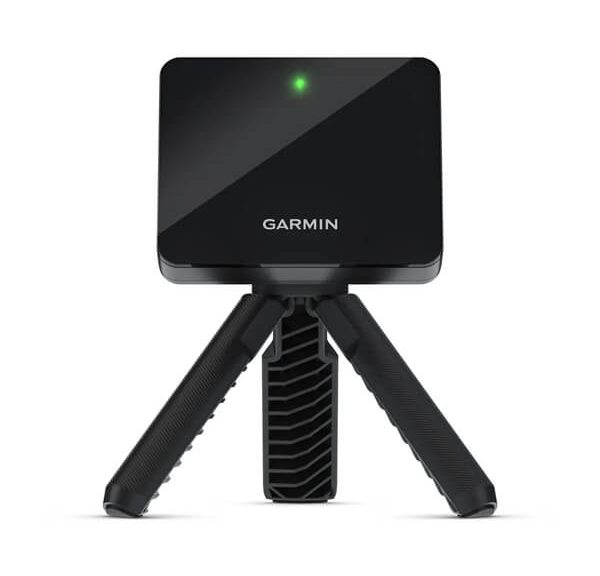
3. Garmin Approach R10 — Best Mid-Range
The R10 is where Garmin’s golf launch monitor lineup gets interesting for normal humans. It costs roughly half of what the R50 runs, and it still gives you 90% of the data most golfers actually need. Ball speed, club speed, smash factor, launch angle, spin rate, carry, and total distance — all the important stuff.
What makes the R10 special is the portability. It weighs under two pounds, runs for 10 hours on a single charge (yes, ten hours), and connects to your phone via Bluetooth. You can literally toss it in your bag and use it on the range between rounds. Try doing that with a TrackMan.
The 43,000+ course simulator is included, which is wild at this price point. You’re playing Pebble Beach in your backyard net setup for the cost of a new driver. The app also records video of your swings with data overlays, which is super helpful for seeing what that weird 2-iron slice actually looks like.
Accuracy is very good — not quite R50 level, but you’re not paying R50 money either. I found carry distances were within 3-4 yards of my rangefinder on well-struck shots. Mishits and thin shots can throw it off a bit, but that’s true of most radar units in this range.
If you want the best golf launch monitor under $1,000 that you can actually carry to the range, the R10 is it. It’s the one I reach for most often, and that says something.
Need help with your putting too? We’ve got you covered with the best putting practice aids.

- This Bundle Contains: 1 Garmin Approach R10, Portable Golf Launch Monitor, Take Your Game Home, Indoors or to The Driving Range, Up to 10 Hours Battery Life + 1 Signature Series Microfiber Cloth + 1 Signature Series 5000mAh Portable Power Bank with Wall Charger and Car Plug Adapter
- Work to improve your game at home, indoors or on the driving range with a portable launch monitor. Track key metrics when paired with a compatible smartphone with the Garmin Golf app to help better your shot consistency, including club head speed, ball speed, swing tempo, ball spin, launch angle and more
- Enjoy more time on the range with up to 10 hours of battery life. Understand your golf strengths and areas for improvement by using training mode, which tracks stats for each club and shows a shot dispersion chart based on estimated ball flight using the Garmin Golf app
- You are up to three other golfers can likely play your own home course or even a course you're going to play on your next trip with virtual rounds for more than 42,000 worldwide courses. See and analyze your own swing with automatically recorded video clips that include the metrics of that swing when paired with a compatible smartphone with the Garmin Golf app
- Included phone mount easily attaches to a golf bag for better viewing and easier interaction with the Garmin Golf app. With an active subscription and the Garmin Golf app, play virtual rounds on over 42,000 courses around the world and take part in a weekly tournament with scores posted to our global leaderboard
4. Rapsodo MLM2PRO — Best Mid-Range Alternative
Rapsodo’s MLM2PRO is the natural rival to the R10, and it brings some tricks that Garmin can’t match. The big one? It includes two Titleist Pro V1 balls in the box. That’s right — the most expensive golf balls on the market come free with your golf launch monitor. That alone saves you $50-ish dollars right there.
The MLM2PRO combines radar and camera data like the ST MAX, but in a smaller, more portable package. It works both indoors and outdoors, switching modes depending on your environment. The indoor mode uses photometric tracking (reading the ball at impact), while outdoor mode adds doppler radar for full flight tracking.
The shot tracer feature is addictive. It overlays your ball flight on a video of your shot — like the TV broadcasts, but it’s your ball. Share it to Instagram, analyze it with your coach, or just admire that one drive that finally went straight.
Rapsodo’s app includes a swing trainer mode that gives you a speed score and consistency rating, plus a shot tracker for on-course use. It’s not just a range tool — you can use it during actual rounds to map your distances and see your real-world dispersion patterns.
For a portable golf launch monitor that works equally well in your garage and on the range, the MLM2PRO is hard to beat. The included Pro V1s are a nice touch, and the dual-mode tracking is legit.

- TOUR LEVEL SHOT TRACK ACCURACY — Doppler radar & dual camera setup ensure reliable data on every shot to help you improve faster.
- 15 KEY METRICS CAPTURED — measure spin rate, spin axis, carry distance, club speed, club path, launch angle, and more.
- 45 DAY PREMIUM TRIAL INCLUDED — Unlock simulated courses, 3rd party app integration, target range, impact vision, rapsoo combine, and speed training with your free trial premium membership.
- 30,000+ HOME GOLF SIMULATOR COURSES INCLUDED WITH PREMIUM — play iconic courses or dial in your game with customizable driving range. Multiple tee boxes and game formats for every age or skill level.
- ELITE GOLF SWING TRAINIG AID & LAUNCH MONITOR — capture your swing from any angle to identify patterns, plus view precise club/ball contact in slow motion for deeper insights into your game.
5. Rapsodo Mobile Launch Monitor — Best Budget
Here’s where things get interesting for folks who don’t want to spend four figures on a golf launch monitor. The Rapsodo Mobile Launch Monitor sits behind your ball, uses your iPhone or iPad camera, and gives you real data — ball speed, club speed, launch angle, and smash factor — for a fraction of what the premium units cost.
Yes, it’s iPhone and iPad only. Android users, I’m sorry — you’ll need to look elsewhere. But if you’re in the Apple ecosystem, this thing is a ridiculous value. The GPS view overlays your shots on a satellite image of the range, which is both useful and way more fun than staring at numbers.
Accuracy is surprisingly good for the price. Ball speed and club speed are within 2-3 mph of the expensive units. Launch angle is solid. Where it falls short compared to pricier models is spin rate — it estimates spin rather than measuring it directly. That means carry distance can be off by 5-8 yards on well-struck shots, and more on mishits.
But for the price? This is the budget launch monitor golf fans have been waiting for. If you just want to know if your 7-iron goes 150 or 160, and you want to track your progress over time, the Rapsodo Mobile does the job. It’s not a simulator, it’s not a coaching tool — it’s a solid, affordable way to get real numbers on your game.
Working on tempo? Pair this with a swing tempo trainer for faster improvement.

- PRACTICE AT THE RANGE OR BACKYARD — Get shot-by-shot feedback anywhere you play: the driving range, your backyard, or an indoor net. Every swing returns real numbers, so no session is wasted.
- KNOW YOUR CARRY DISTANCE — Get ball speed, club speed, launch angle, carry distance, and shot shape on every shot, so you can dial in your yardages and track real improvement round after round.
- VIDEO REPLAY WITH SHOT TRACER — Record each swing and watch it back with an on-screen tracer that shows your true ball flight, making it easy to spot and fix swing faults on the spot.
- PORTABLE & BUILT FOR iPHONE/iPAD — Lightweight and easy to pack, it pairs with the free Rapsodo app on iPhone or iPad (iOS only). Premium unlocks simulator courses and game modes, so you know what's included before you buy.
- A STANDOUT GIFT FOR GOLFERS — From beginners to low-handicap players, it gives clear feedback that helps every level improve. An easy gift for the golfer who wants to practice smarter at home.
6. Shot Scope LM1 — Best Ultra-Portable
The Shot Scope LM1 is what happens when you ask: “What’s the smallest golf launch monitor I can still take seriously?” This thing fits in your pocket. Not your golf bag pocket — your actual pants pocket. It’s roughly the size of a deck of cards.
Despite the tiny form factor, the LM1 gives you clubhead speed, ball speed, and smash factor. That’s the core data most golfers need — are you swinging faster, are you making center-face contact, and is your efficiency improving? It also stores session history so you can track your progress over time.
What it doesn’t give you: spin rate, launch angle, or any kind of simulator play. This is purely a golf swing analyzer that lives in your pocket. Set it behind your ball, hit, and check the screen. Simple as that.
The lack of spin data is the real limitation. Without it, carry distance is an estimate, and you can’t really dial in your wedge distances with confidence. But for tracking clubhead speed gains during a speed training program, or checking your smash factor during a range session, the LM1 is honestly all you need.
Battery life is excellent — Shot Scope claims 10+ hours, and in my testing it easily lasted a full week of range sessions on a single charge. It charges via USB-C, which is always appreciated.
If you want something that you’ll actually bring to the range every single time — not “I should set up the launch monitor” but “it’s already in my pocket” — the LM1 is your pick. It’s the most portable golf launch monitor worth owning.

- Advanced ball & club speed tracking
- Real-time smash factor
- Total & carry distance - instantly measured
- Indoor and outdoor use
- Speed training mode
7. Voice Caddie SC200Plus — Best for Swing Speed Training
If you’re working on gaining clubhead speed — and you should be, since it’s the single fastest way to get longer — the Voice Caddie SC200Plus is built for that exact purpose. It speaks your numbers out loud after every shot. No looking at a screen. Just hit, hear your speed, and go again.
The voice feature is genuinely useful when you’re doing speed training. You can stay in your setup position and get instant feedback without breaking your rhythm to check a phone. It announces club speed, ball speed, smash factor, and carry distance.
The SC200Plus has a 12-hour battery life, which is the best in this entire lineup. You could literally leave it on for an entire day at the range and it’d still be going. It also has barometric pressure calibration, which adjusts distance calculations based on altitude and weather conditions — a nice touch for accuracy.
As a golf launch monitor, it’s solid but basic. You get club speed, ball speed, smash factor, and carry. No spin, no launch angle, no simulator. But as a speed training tool? It’s perfect. Set it to voice mode, do your superspeed protocols, and hear your numbers instantly.
It works for both indoor and outdoor use, with separate modes for each. Indoor mode calibrates for net practice, while outdoor mode tracks full ball flight. The screen is easy to read in sunlight, which isn’t always a given at this price point.
Pair this with a weighted training club for the ultimate speed training setup.

- ALL-NEW SWING SPEED MODE: With the SC200Plus alternative golf simulator for home or outdoor use, you can perfect your speed and tempo by swinging the club in your living room -- no ball required
- DOPPLER RADAR TECHNOLOGY: Ensure reliable and accurate data collection with Doppler radar technology and calibrating atmospheric pressure sensors featured in every Voice Caddie SC200Plus golf swing monitor
- INSTANT FEEDBACK AND VOICE OUTPUT: Featuring advanced LCD display and voice output, the Voice Caddie golf swing analyzer can easily assess your shot performance in real-time
- ADJUSTABLE LOFT ANGLES: The Voice Caddie versatile indoor golf simulator alternative lets you customize loft angles and simulate various club conditions for comprehensive shot training
- EASY DATA STORAGE: The SC200Plus golf simulator kit conveniently stores your shot data and club statistics, allowing easy retrieval of your average distances for each club
8. PRGR HS-130A — Best Value Under $250
The PRGR HS-130A is proof that you don’t need to spend a fortune to get useful swing data. For under $250, this budget launch monitor golf players can actually afford gives you club speed, ball speed, smash factor, and carry distance. That’s the foundation of understanding your swing.
It uses doppler radar technology — the same basic principle as the expensive units, just without the extra sensors and frills. You set it behind your ball, hit, and it gives you numbers in about two seconds. No app, no Wi-Fi pairing, no firmware updates. It just works.
Is it as accurate as a $2,000 unit? No. Carry distances can be off by 5-10 yards, especially on mishits. Club speed and ball speed are solid — within 2-3 mph of premium units. Smash factor is reliable for checking center-face contact.
What I love about the HS-130A is its simplicity. No app to learn, no subscription to pay, no setup required. Batteries are included (it runs on AAs), and it turns on with one button. This is the golf launch monitor you’ll actually use because it takes zero effort.
It also has a nice practice mode that tracks your session averages so you can see if you’re improving over time. For the price, it’s remarkable. MyGolfSpy’s testing has confirmed that PRGR units consistently punch above their weight class in accuracy for the price. If you just want to know your club speed and whether you’re making solid contact, this is all the launch monitor you need.
Want to see your contact patterns? Combine this with impact tape for a complete practice toolkit.

- ACCURATE GOLF LAUNCH MONITOR – The PRGR Launch Monitor accurately tracks club head speed (with or without a ball), ball speed, smash factor, total & carry distance using advanced doppler radar technology.
- MOST AFFORDABLE LAUNCH MONITOR IN GOLF – Get precise golf swing data for a fraction of the price of high-end launch monitors. No Wi-Fi, Bluetooth, or apps required. Runs on AAA batteries.
- COMPARES TO THE HIGH-END UNITS - The PRGR’s golf swing speed monitor delivers accurate data using precise algorithms and keeps 500 past swings in memory.
- PERSONAL LAUNCH MONITOR OF CHOICE FOR PADRAIG HARRINGTON - 3-Time Major Champion and Hall of Famer Padraig Harrington trusts the PRGR to provide accurate feedback for his golf swing speed training sessions.
- PERFECT FOR SPEED TRAINING & MULTI-SPORT USE - One of the only golf launch monitors that measures club head speed without a ball, making it ideal for swing speed training. Also works for Baseball, Tennis, Soccer, and Hockey.
How to Choose the Right Launch Monitor for You
Picking the best golf launch monitor comes down to one question: what are you actually trying to do? Because the right answer is different for everyone.
If you’re building a home simulator: Go Garmin R50 or SkyTrak ST MAX. The R50 is the all-in-one king — screen, data, simulator, the works. The ST MAX is the better pick if you already have a simulator screen and just need the launch monitor to feed data into your existing setup. Both give you the accuracy and data depth you need for serious golf simulator play.
If you want range data without the premium price: Garmin R10 or Rapsodo MLM2PRO. The R10 has better battery life and Garmin’s course library. The MLM2PRO has the shot tracer and included Pro V1s. Both are excellent portable golf launch monitors that give you way more data than their prices suggest.
If you’re on a budget: Rapsodo Mobile or PRGR HS-130A. The Rapsodo gives you more data (launch angle, GPS view) but requires an iPhone. The PRGR gives you the basics with zero setup and no app required. Both are legitimate options for a budget launch monitor golf practice setup.
If you’re doing speed training: Voice Caddie SC200Plus. The voice output means you never have to break your training rhythm to check numbers. 12-hour battery means it’ll outlast your hands.
If you just want something that fits in your pocket: Shot Scope LM1. It’s the most portable option that still gives you real data. Perfect for the “I’ll just toss it in my pocket” approach to practice.
Key Metrics Every Launch Monitor Should Track
When you’re shopping for a golf launch monitor, here are the numbers that actually matter and why:
Ball Speed: The single most important metric. Higher ball speed = more distance. Period. If you’re not tracking ball speed, you’re guessing.
Club Speed: Tells you how fast your swing is. This is the number you want to increase through speed training. Most amateurs are 10-15 mph slower than they think.
Smash Factor: Ball speed divided by club speed. This tells you how efficiently you’re transferring energy. A 1.50 smash factor with a driver means you’re making solid contact. Below 1.40? You’re losing distance to poor contact, not slow swing speed.
Launch Angle: The vertical angle the ball leaves the clubface. Too high or too low and you’re losing carry distance. This is critical for optimizing your driver and long irons.
Spin Rate: Backspin (and sidespin on premium units). Backspin that’s too high kills your distance. Sidespin tells you why you’re slicing or hooking. Not every golf launch monitor measures spin — the budget units estimate it.
Carry Distance: How far the ball flies in the air. This is the number you actually use on the course. Total distance includes roll, which varies wildly by conditions, so carry is what you should calibrate to.
Understanding these metrics is the whole point of owning a golf launch monitor. Without data, you’re just hitting balls and hoping. With data, you can actually work on the specific things that will lower your scores.
Indoor vs. Outdoor: Where Will You Use It?
This matters more than most people realize. Not every golf launch monitor works well in both environments, and some are built specifically for one or the other.
Indoor use (hitting into a net): You need a unit that can read the ball in a short space. Photometric units (like SkyTrak and Rapsodo MLM2PRO indoor mode) read the ball at impact, so they work in tight spaces. Doppler radar units need more ball flight to track — usually 12+ feet. The Garmin R10 works indoors but needs at least 8 feet of ball flight for accurate readings.
Outdoor use (on the range): Doppler radar units shine here because they can track the full ball flight. This gives you more accurate distance data, especially for longer clubs. The Garmin R50, R10, and the Rapsodo units all perform their best outdoors.
Both: If you want a launch monitor for home practice and range sessions, look for a unit with dual-mode operation. The Rapsodo MLM2PRO switches between indoor and outdoor modes, and the Garmin units handle both well with enough space.
One more thing — hitting into a net indoors means you can’t see where the ball actually goes. A golf launch monitor with simulator capability (like the R50, ST MAX, or R10) solves this by showing your ball flight on screen. It makes indoor practice way more engaging and useful.
Launch Monitor vs. Golf Simulator: What’s the Difference?
These terms get thrown around interchangeably, but they’re not the same thing. A golf launch monitor is the device that reads your shot data. A golf simulator is the complete setup — launch monitor plus software, screen, and often a hitting mat — that lets you play virtual courses.
Think of it this way: the launch monitor is the sensor. The simulator is the experience. You can use a launch monitor on its own at the range. You need a launch monitor (plus other stuff) to build a simulator.
Some units blur the line. The Garmin R50 has a built-in screen and comes with course software, so it’s basically a portable simulator without needing an external display. The SkyTrak ST MAX is designed from the ground up as a simulator feed — it’s meant to connect to a bigger setup.
If you just want data for range sessions, any launch monitor will do. If you want to play virtual rounds at Pebble Beach in your garage, you need one with simulator capabilities — plus a net, a hitting mat, and ideally a projector or large screen.
The good news is that most mid-range and premium golf launch monitors in 2026 include some form of simulator play. Even the R10 gives you access to 43,000+ courses through Garmin’s app. You don’t need to spend five figures to play simulated golf anymore.
What About Accuracy? Can You Trust the Data?
This is the question everyone asks. The honest answer: it depends on the unit and the metric.
Premium units like the R50 and ST MAX are accurate within 1-2% of lab-grade equipment for ball speed and carry distance. That’s Tour-level data at a fraction of the cost. Club speed numbers are extremely reliable across almost all units — it’s the easier metric to measure.
Mid-range units like the R10 and MLM2PRO are within 3-5% on most metrics. Spin rate is where you’ll see the most variance — estimated spin on budget units can be off by 500-1000 rpm. That translates to a few yards of carry difference, which matters for fitting but less so for general practice.
Budget launch monitors like the PRGR HS-130A and Rapsodo Mobile are accurate enough for tracking trends. If your club speed goes from 92 to 97 mph over a training program, any of these units will show that improvement. They might not be perfect for absolute numbers, but for tracking progress, they’re solid.
The key insight: you don’t need Tour-level accuracy to get better. A golf launch monitor that’s consistently 3% off still tells you when you’re swinging faster, making better contact, or launching it higher. Consistency matters more than absolute precision for most amateurs.
According to MyGolfSpy’s independent testing, even sub-$500 launch monitors provide data that’s reliable enough for club fitting and swing analysis when used correctly. The gap between a $300 unit and a $3,000 unit is real, but it’s smaller than most golfers think.
Tips for Getting the Most Out of Your Launch Monitor
Buying a golf launch monitor is only half the battle. Here’s how to actually use it to get better:
Warm up before you start tracking. The first 10-15 swings of any session are warmup hits. Don’t make decisions about your distances based on cold swings. Hit 15 balls, then start recording.
Use the same balls. Range balls are typically harder and shorter than premium balls. If you want to know your real distances, use the ball you actually play. This is one reason the MLM2PRO’s included Pro V1s matter.
Track trends, not individual shots. One great 7-iron doesn’t mean you carry it 170. Look at your average over 10+ shots. Most golf launch monitors with apps will calculate session averages for you.
Calibrate your gaps. Use your launch monitor to build a proper distance chart. Hit 5 shots with each club and record the average carry. This is the single most useful thing you can do with a launch monitor — knowing your real distances on the course.
Don’t chase numbers blindly. Faster isn’t always better. If you’re gaining 3 mph of club speed but your smash factor is dropping, you’re getting sloppier, not better. Look at the whole picture.
Use it for specific practice. Don’t just hit balls aimlessly. Pick a goal — “hit 10 8-irons with a smash factor above 1.35” — and use your golf launch monitor to measure against that goal. Structured practice beats mindless ball-beating every time.
Once you know your distances, you need a rangefinder to use them on the course.
Final Verdict: Which Launch Monitor Should You Buy?
After testing all eight of these golf launch monitors, here’s my bottom-line recommendation for each type of buyer:
The “I want the best, money is secondary” buyer: Garmin Approach R50. It’s the most complete best golf launch monitor package available — data, simulator, screen, swing video. Nothing else comes close to this level of all-in-one capability.
The “I’m building a home simulator” buyer: SkyTrak ST MAX if you already have a screen setup, or Garmin R50 if you want the built-in display. Both are excellent for golf simulator use with accurate, reliable data.
The “I want real data without going broke” buyer: Garmin Approach R10. Best overall value in the mid-range. Portability, 10-hour battery, simulator play, and solid accuracy. This is the sweet spot for most golfers.
The “I practice at the range and want portable data” buyer: Rapsodo MLM2PRO or Shot Scope LM1. The MLM2PRO gives you more features; the LM1 gives you zero-friction portability. Both are legit portable golf launch monitors.
The “I just want to know my club speed” buyer: PRGR HS-130A or Voice Caddie SC200Plus. The HS-130A is simpler and cheaper. The SC200Plus adds voice output and longer battery life. Both give you the core numbers without the premium price tag.
The bottom line: any of these units will make you a better golfer if you actually use the data. The best golf launch monitor is the one you’ll bring to the range, set up, and pay attention to. Buy the one that fits your budget and your practice habits, and start tracking your game for real.
You Might Also Enjoy
If you found this guide helpful, check out these other reviews from TheGolfingLad:
Best Golf Rangefinder With Slope 2026 — Know your distances on the course, not just the range.
Best Golf Practice Aids for Putting — Because a golf launch monitor won’t help you three-putt less.
Best Golf Swing Tempo Trainer — Pair your launch monitor data with better tempo for real improvement.
Best Golf Weighted Training Club — Build speed off the course, measure the results on it.
Best Golf Impact Tape and Stickers — See where you’re making contact, then use your launch monitor to measure the difference.