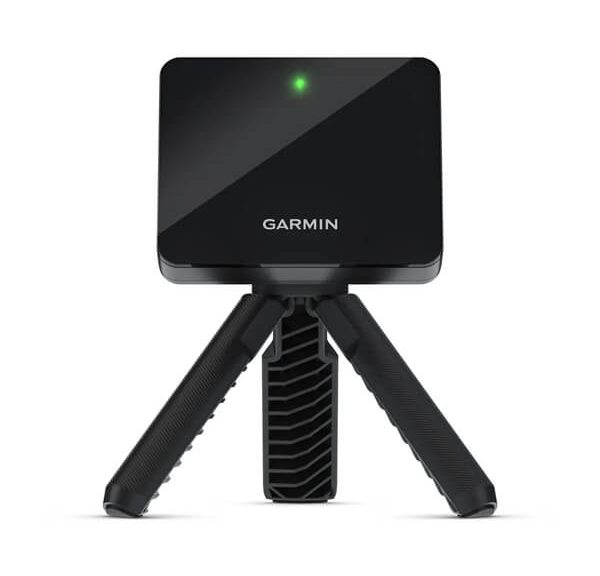
Garmin Approach R10 Launch Monitor Review – Game Improvement at Home
Look, I’ll be straight with you: the Garmin Approach R10 is the launch monitor I actually recommend when a buddy at the range asks me what to buy. Not because it’s perfect — it isn’t — but because it hits a sweet spot that nothing else in its price class touches. It measures the stuff you actually care about, it connects to simulation software that’s genuinely fun to use, and it fits in your bag pocket. For most golfers looking to practice smarter at home or on the range, this thing is hard to beat. Here’s everything you need to know.
The R10 sits in a crowded field of launch monitors under $1,000 — a category that’s exploded over the past few years. Garmin, a company better known for GPS watches and navigation devices, surprised everyone when they brought real Doppler radar technology to a $599 price tag. Before the R10, that kind of hardware cost five to ten times more. They didn’t just shrink the price; they built a full ecosystem around it.

- Work to improve your game at home, indoors or on the driving range with a portable launch monitor .Waterproof : IPX7.Control Method:Application,VoiceWater Resistant: Yes.Club Head speed accuracy : plus/- 3 mph, Ball speed accuracy : plus/- 1 mph, Launch angle accuracy : plus/- 1 degree, Launch direction accuracy : plus/- 1 degree.
- Track key metrics when paired with a compatible smartphone with the Garmin Golf app to help better your shot consistency, including club head speed, ball speed, swing tempo, ball spin, launch angle and more
- Understand your golf strengths and areas for improvement by using training mode, which tracks stats for each club and shows a shot dispersion chart based on estimated ball flight using the Garmin Golf app
- See and analyze your own swing with automatically recorded video clips that include the metrics of that swing when paired with a compatible smartphone with the Garmin Golf app
- With an active subscription and the Garmin Golf app, play virtual rounds on over 42,000 courses around the world and take part in a weekly tournament with scores posted to our global leaderboard
Design and Portability: Built for the Everyday Golfer
A Pocket-Sized Powerhouse
The first thing you notice when you pull the R10 out of the box is how small it is. At 3.5″ × 2.8″ × 2″ and just 10.5 ounces, it genuinely fits in the side pocket of your golf bag. That’s not marketing fluff — I’ve had it rattling around in there alongside tees, a glove, and a half-eaten granola bar. It survives.
The build quality is solid without being flashy. The housing is hard matte plastic with a rubberized grip base. It’s not going to win any design awards, but it feels like something that can handle being tossed into a bag repeatedly. The status LED on the front gives you a simple visual confirmation that it’s powered on and tracking. There’s a standard 1/4-20 tripod thread on the bottom, which means any cheap camera tripod from Amazon will work — you don’t need anything special.
Battery life is rated at 10+ hours, and in my experience that’s about right under normal conditions. A full day of range sessions rarely drained it completely. If you’re running it in simulator mode — screen on, Bluetooth active, actively logging shots — expect something closer to 8 hours. Either way, you’re not going to run out of juice mid-session unless you’re unusually dedicated. Charging is via micro-USB (not USB-C, which is a minor gripe), and a full charge takes a couple of hours.
Setup That Actually Takes Minutes
One of the R10’s genuine strengths is how fast you can go from “pulled it out of the bag” to “hitting shots with data.” The process is:
- Download the Garmin Golf app on your phone or tablet
- Power on the R10 and pair via Bluetooth
- Position the unit 6–8 feet directly behind the ball, aimed at your target
- Make sure the top of the unit is level with your ball
- Start hitting
That’s it. No complex alignment rituals, no calibration targets, no waiting for satellite lock. The device auto-detects what kind of club you’re hitting based on the data it collects, and it adjusts its algorithms accordingly. It’s not always perfect at identifying a 9-iron versus a pitching wedge, but the raw numbers it’s collecting don’t change — only the clubhead speed thresholds it uses internally.
One thing worth knowing: you do need to set your handedness (right or left) in the app before you start. Swing direction matters for the Doppler readings, and getting this wrong will produce garbage face angle and club path data. Takes 10 seconds to set; just don’t forget it.
The Radar Technology: How It Actually Works
Doppler vs. Camera — Why It Matters
The R10 uses Doppler radar, the same basic physics principle behind weather radar and speed guns. It emits a continuous radio wave, that wave bounces off the moving ball and club head, and the frequency shift in the return signal tells the device how fast those objects are moving and in what direction. It does this thousands of times per second during the split-second of impact and initial ball flight.
This is fundamentally different from how camera-based systems like the Rapsodo MLM2PRO work. Camera systems capture visual images of the ball at impact and calculate data from the position of the ball in sequential frames. Each approach has trade-offs.
Radar’s main advantage is that it doesn’t care about lighting. Whether you’re in a sunlit backyard, a dimly lit garage, or a fluorescent-lit basement, the radio waves work the same. Camera systems can struggle with inconsistent lighting, and some require specific ball markings to track spin accurately.
The trade-off for radar is that it works best when the ball travels away from the unit along a consistent path. If you’re hitting significantly off-axis (big pulls or pushes), the radar has less data to work with. It also can’t physically see the ball land outdoors, so carry distance outdoors is still a calculation based on the launch conditions, not a GPS-tracked measurement. More on that in the accuracy section.
What the R10 Actually Measures
Here’s the full data set you get from the R10:
Ball Data:
- Ball speed (mph)
- Launch angle (degrees)
- Launch direction (degrees left or right of target)
- Carry distance (yards)
- Total distance (yards)
- Spin rate (rpm)
- Spin axis (degrees — tells you if it’s hook or slice spin)
Club Data:
- Club head speed (mph)
- Club path (degrees in-to-out or out-to-in)
- Face angle (open or closed at impact)
- Angle of attack (degrees up or down)
- Smash factor (ball speed divided by club speed — efficiency metric)
That’s a genuinely useful data set. The club path and face angle combination alone is worth the price of admission for anyone working on their shot shape. Knowing whether your slice comes from an open face, an outside-in path, or both is the difference between actually fixing something and just hoping on the range.
Accuracy: The Honest Assessment
Outdoor Performance
Outdoors on a calm day, the R10 is impressively accurate for its price. In side-by-side testing against a Trackman (which retails around $25,000) over several hundred shots:
- Ball speed: Within ±2 mph — effectively the same reading
- Launch angle: Within ±1 degree — rock solid
- Club head speed: Within ±1.5 mph — very reliable
- Carry distance: Within ±5 yards — good enough for any practical purpose
- Spin rate: Within ±200–300 rpm — acceptable, but this is where it shows its limits
The spin numbers are the one area where I’d push back on treating the R10’s data as gospel. At 3,000 rpm vs. 3,200 rpm, the difference in real-world ball flight is small. But if you’re trying to optimize spin loft for a specific launch condition, you want more precision than the R10 provides. For game improvement purposes though, knowing your 7-iron is generating 6,800 rpm versus the ideal 7,200 rpm is completely actionable information.
One consistent quirk: the R10 tends to read carry distance slightly long on shorter irons (inside 100 yards). Not dramatically — usually 2–4 yards — but worth knowing if you’re building a precise gapping chart. Hit a few extra shots with wedges and average them out.
Indoor Performance: Know the Difference
This is where I want to be really clear, because I see people get frustrated with the R10 when they don’t understand how indoor mode works.
When you’re hitting into a net or impact screen indoors, the ball doesn’t travel. The R10 radar can track the ball for the first few feet of flight — long enough to capture ball speed, launch angle, and spin. From those three data points, it runs a ballistic model to calculate what the carry distance would have been in standard outdoor conditions. It does not measure carry distance indoors. It calculates it.
This is the same approach every radar-based launch monitor in this price range uses. The calculation is generally solid for full swing shots with a reasonable launch angle. It gets less reliable with very low drivers (under 8 degrees launch) and very high wedges (over 35 degrees launch) where the ballistic model has to extrapolate further.
For simulator purposes, the calculated distances feed into the software, and E6 Connect uses them to determine where your ball lands on the virtual course. You’ll notice simulator distances running a few yards different from your actual outdoor distances — that’s expected. Dial in your distances outdoors first, then use the sim for the experience.
E6 Connect: The Simulator Experience
What You Get Out of the Box
The R10 comes with a subscription to E6 Connect, which includes five courses right from the start: Pebble Beach, Pinehurst No. 2, Bandon Dunes, Torrey Pines South, and one rotating selection. For most people setting up their first home simulator, five courses is plenty to get started — especially when one of them is Pebble Beach.
E6 is one of the more established simulator software platforms on the market, and it shows. The graphics are solid (not photo-realistic, but clean and readable), the physics engine handles ball flight convincingly, and the UI is intuitive enough that you can navigate it without a manual. The course recreation quality varies — Pebble looks great, some of the lesser-known courses feel a bit generic — but for casual play and practice, it absolutely does the job.
Multiplayer works through E6’s servers, so you can set up a round with friends playing from their own home simulators. In practice, the experience depends on everyone having reasonable internet connections and the same or compatible software subscriptions. When it works, it’s genuinely fun.
Subscription Tiers and Value
The free tier includes those five courses and some practice ranges. If you want access to E6’s full library (which runs into the hundreds of courses), you’re looking at a paid subscription. The pricing has changed a few times, so check E6’s current rates — but expect to pay in the $200–400 per year range for full access.
Is it worth it? If you’re primarily using the R10 for range practice and data collection, probably not. The free courses are enough to keep things interesting. If you’re building a dedicated simulator setup and want variety, a full E6 subscription is a reasonable add-on to the overall cost.
One thing Garmin includes that often gets overlooked: Home Tee Hero. This is their own built-in sim mode within the Garmin Golf app, and it works without any additional subscription. The graphics are simpler than E6, but it’s functional and free, which matters if you’re trying to keep the overall cost down.
Building a Full Simulator Setup
The R10 is a legitimate backbone for a home simulator. Here’s what a real budget looks like:
- Garmin Approach R10: ~$600
- Impact screen (basic): $200–350
- Net/enclosure: $300–800
- Short-throw projector: $400–1,000
- Hitting mat: $100–300
- Total: $1,600–3,050
Versus a commercial SkyTrak-based setup at $2,000+ just for the launch monitor, or a full Foresight Sports GCQuad build at $15,000+, the R10 setup is genuinely accessible. You won’t get tour-level accuracy, but you’ll get a setup that’s fun to use and actually makes you a better golfer.
The Garmin Golf App: Better Than You’d Expect
Core Features
Garmin Golf is the hub for everything R10-related, and it’s more capable than most people realize at first glance. Every shot you hit automatically logs to your session history, with full data for each swing. You can scroll back through a session and see exactly what your 7-iron was doing on shots 1 through 50 — useful for spotting patterns you might not notice in the moment.
The app also integrates with Garmin’s broader sports platform. If you already wear a Garmin GPS watch on the course, your actual round stats feed in alongside your practice session data. You get a more complete picture of your game than any single device could provide alone.
Club gapping is where the app earns its keep. Hit 10 or more shots with a given club, and the app builds a gapping profile — average carry, average total distance, and the range (so you know your 7-iron averages 158 yards but has a range of 151–165 depending on quality of strike). That’s the data your club selection on the course should actually be based on, not the number printed in some generic distance chart.
The Virtual Combine
Garmin’s Virtual Combine is a set of structured challenges — hit X balls within a target distance window, hold a consistency threshold across 10 shots, max out your smash factor — that turn a standard range session into something closer to a game. It’s a small thing, but it works. Sessions where I’m chasing a Combine score feel more focused than sessions where I’m just hitting balls into the void.
You can track your Combine scores over time and see if your consistency and efficiency are actually improving. It’s honest feedback that doesn’t require a teaching pro standing next to you.
Third-Party App Support
The R10 isn’t locked to Garmin’s ecosystem. It works with Awesome Golf (a simulator app with a more modern UI and a decent course library), GSPro (popular with the home sim community for its physics and course quality), and various other GSPro-compatible software. The R10 connects to these through a standard API that’s been well-supported by the third-party developer community.
If you buy the R10 and end up not vibing with E6 Connect’s course selection or UI, you have real alternatives. That flexibility adds meaningful value to what you’re paying for.
Indoor vs. Outdoor: Where the R10 Shines
The short version: the R10 is better outdoors than indoors, but it’s usable in both environments.
Outdoors, on a driving range or in a backyard with enough room, is where you get the most accurate data. Ball speed, launch angle, and spin track are tight. Carry distance estimates are reliable for game improvement purposes. The radar has the most data to work with because the ball actually travels.
Indoors, the R10 performs best with full swing shots (driver through 7-iron). As you move into shorter irons and wedges, the calculated distances become less reliable because the ball’s flight time before hitting the screen is shorter, giving the radar less data. For sim play, this usually isn’t a big deal — you’re playing a course and the feel of the game matters more than whether your gap wedge simulates as 97 yards versus 94 yards. For serious indoor practice on your short game, the limitations become more relevant.
One practical consideration: the R10 needs 6–8 feet directly behind the ball. In a tight garage or basement, this sometimes requires creative setup. The tripod needs to be on stable ground, positioned and aimed at your target line. If your hitting area is narrower than about 8 feet wide, you might find the unit clips walls or can’t sit comfortably behind the ball.
How It Compares to the Competition
Let’s talk about the main alternatives in the same price range, because knowing where the R10 fits helps you decide if it’s actually right for you.
Garmin R10 vs. Rapsodo MLM2PRO (~$700)
The Rapsodo MLM2PRO uses a dual-camera and radar hybrid system. The camera component gives it better spin accuracy than the R10 in good lighting conditions. Indoors under consistent lighting, the MLM2PRO’s spin numbers are more trustworthy. Outdoors, the two units are comparable. The R10 has better app ecosystem depth with Garmin Golf’s tracking and integration features. The MLM2PRO has better raw spin data. Your call on which matters more.
Garmin R10 vs. FlightScope Mevo+ (~$2,000)
The FlightScope Mevo+ is a different tier of device — it tracks more data points (including carry distance measured outdoors via GPS tag), has better spin accuracy, and handles short game shots more reliably. It also costs more than three times as much. If you’re a serious amateur, a 5-handicap or better who wants the most complete data possible, the Mevo+ is worth the price jump. For the other 95% of golfers, the R10’s data is actionable enough that you’d spend the extra $1,400 better on lessons or fitting.
Garmin R10 vs. SkyTrak (~$2,700+)
SkyTrak is a photometric (camera-based) system that’s been the home simulator standard for years. Its spin data is excellent, and its simulator software integration is mature. But it costs roughly four times the R10, requires a subscription for full software access, and is less portable. The R10 eats SkyTrak’s lunch on value and portability. SkyTrak wins on spin accuracy and dedicated sim-room use cases.
Bottom line: if your budget is under $1,000 and you want a radar-based system with solid app support and sim capability, the R10 is the strongest option in that box.
Who Should Buy the Garmin Approach R10
I get asked some version of “is the R10 right for me?” constantly. Here’s my honest answer based on different golfer profiles:
Buy it if:
- You practice at a range regularly and want data to make that time more purposeful
- You’re building a home simulator on a budget (under $3,000 total)
- You want to build a real, data-driven club gapping chart
- You already use Garmin devices and like the ecosystem
- You’re a 10–30 handicap golfer focused on understanding your swing better
- You travel to different ranges and need a portable unit that sets up fast
- You want to play Pebble Beach from your garage
Look elsewhere if:
- You need precise spin data for professional club fitting — the R10’s spin numbers aren’t accurate enough for fitting work
- Your primary focus is putting and short game (the R10 is essentially useless for chips and putts)
- You’re a scratch golfer or better who wants to optimize launch conditions to within tight margins
- Your only available hitting space is less than 6 feet behind the ball
- You need indoor carry distance tracking rather than calculated estimates
Pros and Cons
| Pros | Cons |
|---|---|
| Excellent value at ~$600 — best radar unit in the price class | Indoor carry distances are calculated, not measured |
| Genuinely portable — fits in your bag pocket | Spin rate accuracy is below average compared to photometric units |
| Works in any lighting (radar doesn’t care about sun or darkness) | Short game and putting data essentially non-existent |
| Fast, no-fuss setup — 5 minutes from bag to first shot | Needs 6–8 feet clear behind the ball — tough in small spaces |
| 10+ hour battery life handles full practice sessions | Micro-USB charging (not USB-C) |
| Strong app ecosystem with Garmin Golf + third-party support | Full E6 Connect course library requires paid subscription |
| E6 Connect integration with 5 free courses including Pebble Beach | Club identification isn’t always accurate (affects display, not raw data) |
| Club path, face angle, and smash factor are genuinely useful | Not suitable for professional fitting work |
| Virtual Combine gamification makes practice more engaging | Outdoor carry distance still a calculation, not GPS-tracked |
Specs at a Glance
| Spec | Detail |
|---|---|
| Technology | Doppler radar |
| Dimensions | 3.5″ × 2.8″ × 2″ |
| Weight | 10.5 oz |
| Battery Life | 10+ hours |
| Connectivity | Bluetooth (to phone/tablet) |
| Tripod Mount | Standard 1/4-20 thread |
| Charging | Micro-USB |
| Ball Speed Accuracy | ±2 mph |
| Carry Distance Accuracy | ±5 yards (outdoor) |
| Positioning | 6–8 feet behind ball |
| Simulator Software | E6 Connect, Home Tee Hero, GSPro, Awesome Golf |
| Companion App | Garmin Golf (iOS & Android) |
| MSRP | ~$599.99 |
- Work to improve your game at home, indoors or on the driving range with a portable launch monitor .Waterproof : IPX7.Control Method:Application,VoiceWater Resistant: Yes.Club Head speed accuracy : plus/- 3 mph, Ball speed accuracy : plus/- 1 mph, Launch angle accuracy : plus/- 1 degree, Launch direction accuracy : plus/- 1 degree.
- Track key metrics when paired with a compatible smartphone with the Garmin Golf app to help better your shot consistency, including club head speed, ball speed, swing tempo, ball spin, launch angle and more
- Understand your golf strengths and areas for improvement by using training mode, which tracks stats for each club and shows a shot dispersion chart based on estimated ball flight using the Garmin Golf app
- See and analyze your own swing with automatically recorded video clips that include the metrics of that swing when paired with a compatible smartphone with the Garmin Golf app
- With an active subscription and the Garmin Golf app, play virtual rounds on over 42,000 courses around the world and take part in a weekly tournament with scores posted to our global leaderboard
Final Verdict
The Garmin Approach R10 isn’t the most accurate launch monitor on the market, and it won’t pretend to be. What it is, consistently, is the right tool for a large portion of recreational golfers who want real data without a five-figure investment.
The Doppler radar delivers ball speed, launch angle, and club metrics that are accurate enough to change how you practice. The app ecosystem — Garmin Golf plus E6 Connect plus third-party sim support — is genuinely deep. The portability means you’ll actually use it instead of leaving it in the garage. And the 10-hour battery means it keeps up with even your most ambitious practice sessions.
If you’re a mid-to-high handicapper who wants to understand what your swing is actually doing, build a real gapping chart, or play some virtual rounds on a famous course from your living room, this is a very strong choice. If you’re a serious competitive golfer who needs precise spin numbers for equipment fitting or detailed wedge optimization, you’ll want to step up to something like the FlightScope Mevo+ and accept the higher price tag.
For everyone else — and that’s most of us — the R10 makes your practice time more productive, your gapping more accurate, and your off-season significantly more fun. That’s a lot to ask of a $600 device, and it delivers.
Our Rating: 4.6 / 5
Want to see how it stacks up across the full category? Check out our roundup of the best golf launch monitors under $1,000 for a side-by-side look at all the top options.