Best Golf Swing Analyzers 2026: Tech to Fix Your Swing at Home
Best Golf Swing Analyzers 2026: Tech That Actually Fixes Your Swing at Home
Here’s the deal: hitting balls without feedback is just practicing your bad habits. You can stripe 200 balls at the range and walk away swinging worse than when you showed up. The best golf swing analyzers give you the data loop that turns mindless repetition into real improvement — club speed, swing path, face angle, tempo, attack angle. All the stuff your body can’t feel on its own.
The market has matured fast. In 2026, you’ve got a clear split between three categories: club-mounted sensors that live on the grip, body sensors that track your wrist or lead arm, and launch monitors that pull swing data alongside ball flight numbers. Each solves a different problem, and picking the wrong one is an expensive mistake.
This guide covers the top six best golf swing analyzers you can use at home, what they’re actually good at, and who should buy each one. No fluff, no padding — just the rundown you need to spend your money right.
The Three Types of Golf Swing Analyzers (And Why It Matters)
Before getting into specific products, it’s worth understanding what you’re actually buying — because “swing analyzer” gets slapped on a lot of different hardware that works in very different ways.
Club Sensors
These attach to the grip end of your club (or replace the grip cap) and track the motion of the club itself. They measure swing speed, tempo, backswing length, transition, and sometimes face angle at impact. Arccos Smart Sensors and Blast Motion Golf fall into this bucket. The big advantage: they’re measuring what the club is actually doing. The limitation: they can’t tell you much about your body mechanics — only the end result.
Body Sensors
Body sensors track your movement, not the club’s. HackMotion, for example, mounts on your lead wrist and measures wrist flexion, extension, and radial/ulnar deviation throughout the swing. These are the ones PGA Tour coaches have started integrating into lesson plans because they capture the biomechanics that produce good (or terrible) contact. Higher learning curve, but the data goes deeper.
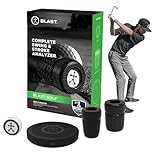
- LOWER YOUR SCORES: Blast Golf works from tee to green and by focusing on your short game, you'll lower your scores fast! The Blast sensor provides real-time feedback that's sent automatically to the Blast golf smart phone app.
- BLAST MEMBERSHIP: is included for new users with purchase (1 month included). Setup and management are done entirely through the Blast app. Membership connects to your account digitally, separate from the physical sensor for convenience.
- TRAIN ANYWHERE, ANYWHERE: No ball, no problem! Use Air Swings mode to train anywhere, anytime and improve your skills year-round, regardless of weather, location, or skillset.
- VISUALIZE YOUR SWING: Use the Blast Golf app and smart phone to capture video of your putting or full-swing session and the Blast app will auto-clip the video to provide highlights of each swing or stroke, with metrics overlaid, for easy review.
- THE BLAST ADVANTAGE: Blast Golf is the top swing & stroke improvement solution, trusted by more pros, colleges, & more at every level. The Blast sensor is highly accurate, easy to use, & provides real-time feedback to help lower your scores.

- The GEN 4 system includes 16 weather-resistant, ultra-light, sensors (one for every club in your bag), featuring: 15 regular sensors with long lasting battery AND 1 putter sensor.
- FREE first year's membership to the award winning Arccos app from date of activation for new users only. Membership required after first year.
- Track Your Game Like The Pros, Arccos Is The Official Game Tracker of The PGA TOUR
- Automatic shot tracking, hands-free fully automatic data capture.
- A.I. Powered GPS Rangefinder, first-ever rangefinder that adjusts in real-time for wind (including gusts), elevation, temperature, humidity and altitude providing the most precise yardage in the game the Arccos Caddie Number.

Launch Monitors with Swing Data
The Garmin R10 and Rapsodo MLM2PRO are launch monitors first — they measure ball flight. But both also capture swing metrics like club speed, swing path, and attack angle from radar and camera data. If you’re building a home golf simulator or want one device that covers practice and performance tracking, these are the category to be in.
What Metrics Actually Matter for Improving Your Swing
Swing analyzers throw a lot of numbers at you. Here are the ones worth paying attention to:
- Club Speed: Your raw horsepower. Every mph of club speed translates to roughly 2.5–3 yards of potential distance — if you’re hitting it solid. Tracking speed over time tells you whether your training is working.
- Swing Path: The direction the clubhead is traveling through the impact zone, measured in degrees relative to the target line. Path is the #1 driver of ball starting direction and the key to fixing a slice or hook.
- Face Angle: Where the face is pointing at impact. In combination with path, this determines ball flight shape. Most amateurs have a wide gap between path and face angle — that’s where the big misses come from.
- Tempo: The ratio of your backswing time to downswing time. Tour pros cluster around 3:1 (backswing takes 3x longer than the downswing). Rushing the transition is one of the most common swing killers and something club sensors track well.
- Attack Angle: How steeply or shallowly the club approaches the ball. Driver should be slightly ascending (+2 to +5 degrees). Irons should be descending. This one number explains a lot of distance and contact issues.
- Wrist Angles (flexion/extension/deviation): Specifically relevant to HackMotion. The lead wrist position at the top of the backswing and at impact is one of the biggest predictors of face angle. Tour players consistently show specific wrist patterns that amateurs rarely hit by feel alone.
Not every device measures all of these. When you’re comparing best golf swing analyzers, check the specific metric list — it varies more than you’d expect.
The 6 Best Golf Swing Analyzers in 2026
1. Arccos Smart Sensors — Best for Long-Term Stat Tracking
Price: ~$230 (full set of 14 sensors)

- Work to improve your game at home, indoors or on the driving range with a portable launch monitor .Waterproof : IPX7.Control Method:Application,VoiceWater Resistant: Yes.Club Head speed accuracy : plus/- 3 mph, Ball speed accuracy : plus/- 1 mph, Launch angle accuracy : plus/- 1 degree, Launch direction accuracy : plus/- 1 degree.
- Track key metrics when paired with a compatible smartphone with the Garmin Golf app to help better your shot consistency, including club head speed, ball speed, swing tempo, ball spin, launch angle and more
- Understand your golf strengths and areas for improvement by using training mode, which tracks stats for each club and shows a shot dispersion chart based on estimated ball flight using the Garmin Golf app
- See and analyze your own swing with automatically recorded video clips that include the metrics of that swing when paired with a compatible smartphone with the Garmin Golf app
- With an active subscription and the Garmin Golf app, play virtual rounds on over 42,000 courses around the world and take part in a weekly tournament with scores posted to our global leaderboard

- Advanced Golf Launch Monitor – The Rapsodo MLM2PRO golf launch monitor delivers pro-level accuracy, measuring 13 core golf metrics, including spin rate, spin axis, and swing speed, making it a golf training aid
- Golf Simulators for Home & Practice – Pair this mobile launch monitor with your smartphone or tablet to transform any space into a golf simulator, offering virtual courses and precise golf swing analysis
- Ultimate Golf Tracker & Swing Analyzer – Get real-time data on ball speed, club speed, and launch angle with this cutting-edge golf tracker and swing analyzer, designed to improve accuracy on the course.
- Indoor & Outdoor Golf Training Aid – Whether you're at the driving range or setting up a golf simulator at home, the Rapsodo MLM2PRO provides reliable data, helping golfers perfect their game anywhere.
- MLM2PRO Smart Golf Simulator – Experience realistic golf simulation with the MLM2PRO launch monitor, which integrates with leading golf apps for a full-swing golf simulator exper
Arccos has carved out a unique position: they’re less about fixing your swing in real time and more about exposing where your game is actually leaking strokes. The Smart Sensors screw into the grip end of each club and automatically track every shot via Bluetooth and GPS. No manual logging. The app uses AI caddie technology to surface patterns — “you’re losing 1.8 strokes per round from 50–100 yards” — that you’d never find just from feel.
What they don’t do: they won’t tell you your face angle at impact or your swing plane. The swing data is limited to speed and tempo basics. Arccos is really a golf stat tracking platform with sensor hardware attached. If you want to isolate and drill specific swing mechanics, this isn’t the primary tool for that.
That said, the automatic shot tracking is genuinely excellent. After a few rounds, the Arccos AI starts making specific club-level recommendations based on your actual distances and miss patterns. Annual subscription required (~$99/year after first year), which is worth factoring into the total cost.
Best for: Golfers who want to understand their game holistically — where they lose shots, realistic club distances, course strategy. Less ideal as a pure swing mechanic tool.
2. Blast Motion Golf — Best Pure Swing Sensor for Short Game
Price: ~$130
Blast Motion puts a single sensor on one club at a time — it clips to the grip end in about five seconds. The app gives you real-time feedback on tempo, backswing length, downswing time, and impact zone measurements. Where Blast Motion genuinely stands out is the putting and chipping analysis. Rotation, loft at impact, impact time, and tempo data for the short game is rare, and Blast does it cleanly.
The video sync feature is underrated. You shoot your swing on your phone, and the app overlays the sensor data directly onto the video timeline. So you can see exactly when your tempo broke down or when you decelerated through the ball. It turns abstract numbers into something visual and actionable.
The full-swing data is solid but not as deep as a launch monitor. You’re getting swing mechanics data without ball flight data, which means you’re missing part of the picture for iron and driver work. But for anyone who wants to rebuild their putting stroke or fix their chipping tempo, Blast Motion is the best tool in this price range.
Best for: Golfers focused on short game improvement, or anyone who wants video-synced swing data without spending $500+.
3. HackMotion — Best for Serious Swing Mechanics Work
Price: ~$350–$499 depending on plan
HackMotion is a different animal. It’s a wrist sensor — worn on the lead wrist like a watch — that captures wrist movement in three planes throughout the entire swing: flexion/extension, radial/ulnar deviation, and rotation. The data ties directly to face angle outcomes, which makes it one of the most instructionally relevant devices available outside of a full motion capture system.
The reason PGA instructors have adopted HackMotion is the benchmark database. You’re not just seeing your wrist angles — you’re seeing them compared to tour averages for each phase of the swing. Flat lead wrist at the top of the backswing? HackMotion shows you exactly how far off your position is and guides you toward the tour-average range. It’s like having a reference standard baked into the feedback loop.
The learning curve is real. You need to spend time in the app actually understanding what you’re looking at. But for golfers who are serious about mechanics — who’ve had a lesson and want to actually groove the positions their coach prescribed — HackMotion is the most direct line between feel and data. It’s also excellent for training drills: you can set custom alerts so the device buzzes when your wrist position hits a target range.
The downside is price and specialization. HackMotion is expensive for what it is, and it doesn’t measure ball flight at all. It’s a precision instrument for a specific problem.
Best for: Mid-to-low handicap golfers working with an instructor, or self-taught players who’ve done their homework on swing mechanics and want real-time body feedback.
4. Rapsodo MLM2PRO — Best Dual-Use Swing Analyzer + Launch Monitor
Price: ~$700, often on sale for ~$499–$599
The Rapsodo MLM2PRO sits at the premium end of the best golf swing analyzers list, but it earns its price by doing two jobs at once. Primarily a launch monitor, it uses a combination of camera and radar to track ball flight: ball speed, launch angle, spin rate, carry distance, and shot shape. On the swing side, it captures club speed, smash factor, swing path, and attack angle.
For indoor simulator use, the MLM2PRO connects directly to E6 Connect and other simulation software. For outdoor use, it works with the Rapsodo Golf app, which has clean video playback and shot history. The camera component actually captures face-on video of each shot and syncs it with the data — similar to what Blast Motion does, but with full ball flight numbers layered in.
Where it falls short: the swing path and attack angle data, while useful, isn’t as precise as what a higher-end monitor like a Trackman or Foresight delivers. It’s directionally accurate rather than analytically precise. But for the price point, you’re getting a lot. Most golfers using this at home will find it more than sufficient. Check our full breakdown in the best golf launch monitors under $1,000 guide for more context on where it stacks up.
Best for: Golfers who want a single device for home simulator sessions and swing data, or anyone who practices indoors regularly and wants real ball flight numbers alongside swing metrics.
5. Garmin Approach R10 — Best Value Launch Monitor with Swing Data
Price: ~$599 (frequently discounted to ~$449)
The Garmin R10 is probably the most popular entry-level launch monitor on the market right now, and for good reason: it delivers reliable radar-based ball flight data — ball speed, launch angle, spin, carry distance, shot shape — at a price point that was unthinkable three years ago. For swing data specifically, it tracks club speed, swing tempo, and swing path.
The E6 Connect and Garmin Golf app integrations are polished. Setup takes about 10 minutes, and the accuracy for irons and mid-irons is genuinely good. Driver numbers can skew slightly on heel/toe strikes, which is a known limitation of portable radar units at this price. But for the average recreational golfer building a practice setup, the R10 is an excellent anchor device.
What the R10 won’t do: the swing path and tempo data is less granular than a dedicated club sensor. If swing mechanics are your primary focus, the R10’s swing data is a secondary benefit, not a primary feature. Where it excels is the package deal — solid launch monitor performance with enough swing data to give you directional feedback, at a price that leaves room in the budget for other golf training aids.
Garmin’s subscription model for full simulator software access costs extra, which pushes the real cost of ownership up. Worth factoring in if you’re planning to use it with sim software year-round.
Best for: Golfers who want a capable, affordable launch monitor with basic swing data — especially those building a home practice or simulator setup on a budget.
6. Deadeye Golf Sensor — Best for Instant Impact Feedback
Price: ~$149
Deadeye is the newest entrant on this list and probably the least well-known, but it does something specific extremely well: it tells you precisely where on the face you’re making contact — toe, heel, high, low — shot after shot. The sensor attaches to the back of the clubface (irons and driver) using an adhesive mount, and the companion app maps your impact pattern over time.
Face contact location is one of the most overlooked variables in amateur golf. Two shots with the same swing can produce wildly different results if one is caught on the toe and one is caught center-face. Deadeye makes this visible and trackable. Combined with its speed and path data, you get a lightweight but surprisingly complete picture of what’s happening at the moment of truth.
The hardware is simple and the app is straightforward — you’re not drowning in metrics. That’s actually a feature for golfers who find more complex systems overwhelming. Deadeye is purpose-built for one job and does it cleanly. The tradeoff is that it doesn’t dig into the swing leading up to impact the way HackMotion or Blast Motion do, and it obviously doesn’t track ball flight.
Best for: Golfers who suspect inconsistent face contact is costing them distance and accuracy, or anyone who wants simple, actionable impact data without a steep learning curve.
Price Tiers: What You Get at Each Level
| Price Range | Devices | What You’re Getting |
|---|---|---|
| $100–$200 | Blast Motion, Deadeye | Club sensor data — tempo, speed, impact location. No ball flight. Best for targeted mechanic work. |
| $200–$400 | Arccos Smart Sensors, HackMotion | Either comprehensive stat tracking (Arccos) or deep body mechanics data (HackMotion). Specialized tools. |
| $400–$600+ | Garmin R10, Rapsodo MLM2PRO | Full launch monitor capability with swing data included. Ball flight + swing metrics in one device. |
The pattern is clear: as you move up the price ladder, you’re adding ball flight data and broader ecosystem integration. The cheaper devices are specialists. The more expensive ones try to be platforms.
App Quality Comparison
Hardware is only half the equation. The app determines whether you’ll actually use the data or just watch numbers scroll by.
- Arccos: Polished, deep, and gets better over time as it accumulates your round data. The AI caddie and strokes-gained insights are genuinely useful. Requires patience — it’s not a practice session tool.
- Blast Motion: Clean and easy. Video sync is smooth. Drill library is practical. Works well for short game sessions.
- HackMotion: More technical interface — you’re looking at wrist angle graphs with tour comparison overlays. Not intimidating once you understand the data, but there’s a learning curve. Real-time audio feedback during drills is a standout feature.
- Rapsodo Golf App: Solid shot history, clean visualization, decent video playback. E6 Connect integration works reliably for sim use. Interface is intuitive.
- Garmin Golf App: Well-designed, consistent with Garmin’s broader ecosystem. Shot history is clear. The R10 also integrates with E6 and The Golf Club 2019 for simulator use.
- Deadeye: Simple by design. Impact maps, speed readings, and session history. It doesn’t try to be more than it is, which means there’s nothing to get lost in.
Who Needs Which Type
Choosing between the best golf swing analyzers comes down to three questions: What’s your handicap range? What problem are you trying to solve? How much data do you actually want to process?
High Handicapper (20+)
Start simple. Blast Motion or Deadeye will surface the most obvious problems — poor tempo, inconsistent face contact — without overwhelming you. Don’t invest in HackMotion until you have a baseline swing to measure. A launch monitor in this range might be useful if you also want to build a home sim, but pure swing mechanics work is better served by the lighter tools first.
Mid Handicapper (10–20)
This is where it gets interesting. You likely know your misses, you’ve had at least some instruction, and you’re ready for more specific feedback. Garmin R10 is a strong all-around pick — gives you ball flight data to validate what the swing changes are doing. If you’re working with an instructor, HackMotion becomes worth the price because you can train to specific wrist positions between lessons.
Low Handicapper (0–10)
You need precision. Rapsodo MLM2PRO or a combination setup — HackMotion for body mechanics + a launch monitor for ball flight — gives you the complete picture. Arccos Smart Sensors layered on top helps identify the course management patterns that are costing you strokes at this level. At scratch or near-scratch, the marginal gains come from detail work.
If you’re also into broader equipment and performance tracking, pairing your swing analyzer with one of the best GPS watches for golf gives you course intel on top of your swing data — a solid combination for serious practice-to-round transfer.
The Bottom Line
The best golf swing analyzer for you is the one that measures the gap between what you think your swing is doing and what it’s actually doing. That’s it. If your problem is tempo, Blast Motion nails it. If it’s wrist position and face angle, HackMotion goes places no other device can. If you want ball flight data alongside swing metrics, the Garmin R10 or Rapsodo MLM2PRO are the sensible picks. If you want to understand your whole game over time, Arccos is the long game play.
None of these devices fixes your swing automatically. They’re feedback tools — and feedback only works if you act on it. Buy the one that matches the problem you’re actually trying to solve, put in the reps, and let the data guide the process.
That’s how you get better. Not by buying tech. By using it.
For a wider view of training equipment that pairs well with these devices, check out the full best golf training aids for 2026 roundup.